The Brief
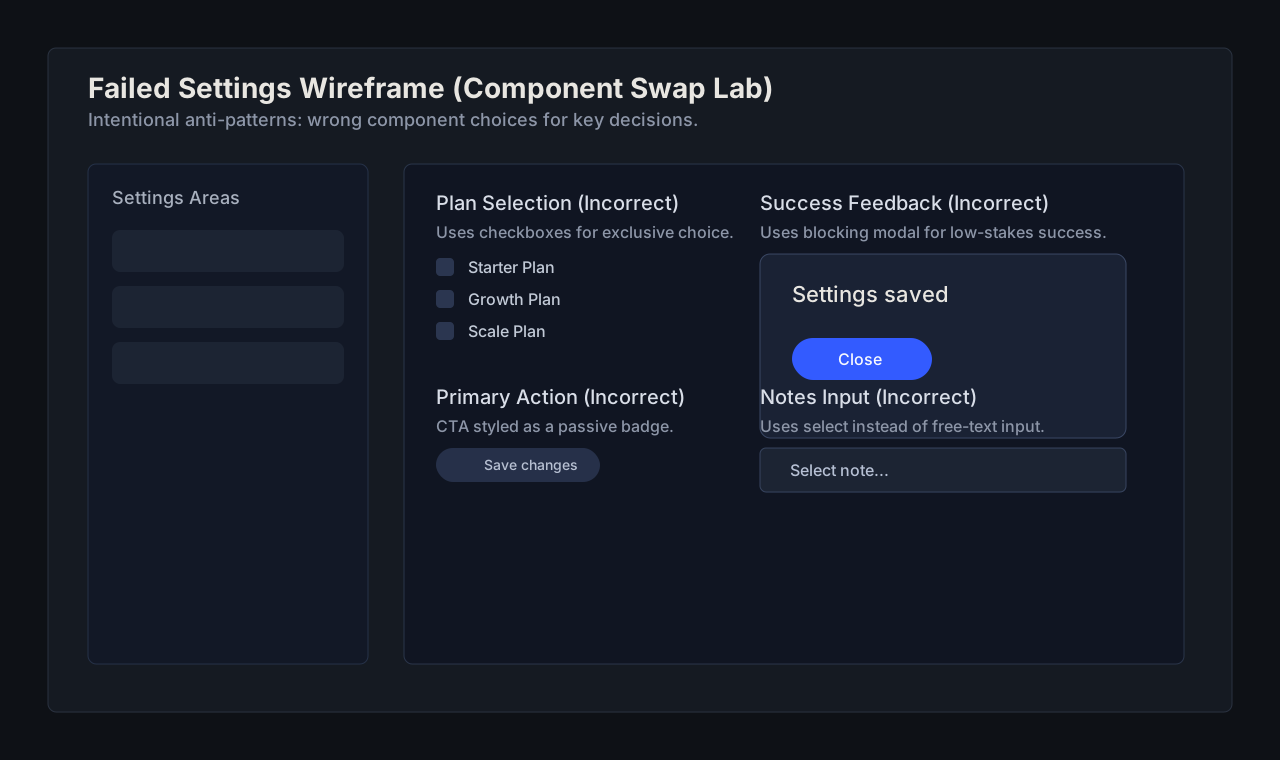
You are given a wireframe with intentionally wrong component choices. Replace five wrong components and annotate why each replacement is better.
Provided Failed Project
Show Failed Project Source
Use /lab-assets/failed-projects/component-swap-failed-settings.svg as the intentionally broken source wireframe.
Open the asset in a new tab and import it into Pencil or Figma before starting swaps.
Starter Prompts
Starter Prompts
In Pencil, import the provided failed settings file from this lab and keep the same content layout. Replace each mismatch: modal for success, checkboxes for exclusive plan choice, badge used as CTA, breadcrumbs on a flat page, and select for free-text notes. Add short annotation notes describing why each swap improves behavior.
Rubric
Lab Checklist (0/5)
Example Output
Show Example Output
Annotated before/after wireframes where each corrected component includes a one-line behavior rationale.
Common Mistakes
Common Mistakes
- Swapping visual style without fixing component behavior.
- Using modals for low-stakes confirmations.
- Replacing controls without checking decision model.
Principles Practiced
component-choicehierarchyconsistency